簡介 (Introduction)
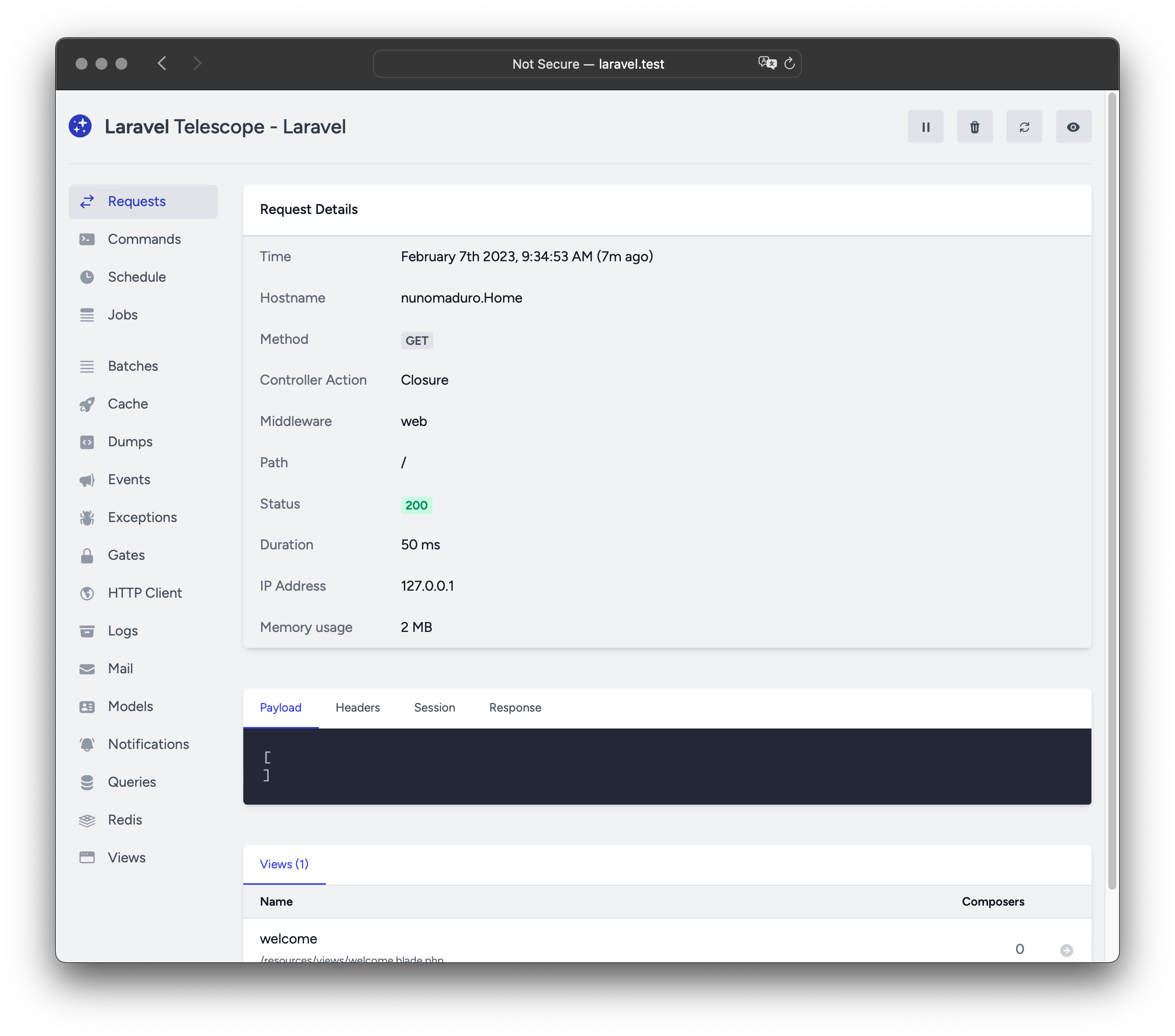
Laravel Telescope 是 Laravel 本地開發環境的絕佳伴侶。Telescope 提供了對進入應用程式的請求、例外、日誌條目、資料庫查詢、排隊的 Job、郵件、通知、快取操作、排程任務、變數 Dump 等的深入洞察。
安裝 (Installation)
你可以使用 Composer 套件管理器將 Telescope 安裝到你的 Laravel 專案中:
composer require laravel/telescope安裝 Telescope 後,使用 telescope:install Artisan 指令發布其資源和遷移。安裝 Telescope 後,你還應該執行 migrate 指令以建立儲存 Telescope 資料所需的資料表:
php artisan telescope:install

php artisan migrate
最後,你可以透過 /telescope 路由存取 Telescope 儀表板。
僅本地安裝 (Local Only Installation)
如果你打算僅使用 Telescope 來協助你的本地開發,你可以使用 --dev 旗標安裝 Telescope:
composer require laravel/telescope --dev

php artisan telescope:install

php artisan migrate
執行 telescope:install 後,你應該從應用程式的 bootstrap/providers.php 設定檔中移除 TelescopeServiceProvider 服務提供者註冊。相反,在 App\Providers\AppServiceProvider 類別的 register 方法中手動註冊 Telescope 的服務提供者。我們將確保在註冊提供者之前,當前環境是 local:
/**
 * Register any application services.
 */
public function register(): void
{
    if ($this->app->environment('local') && class_exists(\Laravel\Telescope\TelescopeServiceProvider::class)) {
        $this->app->register(\Laravel\Telescope\TelescopeServiceProvider::class);
        $this->app->register(TelescopeServiceProvider::class);
    }
}
最後,你還應該透過將以下內容新增到你的 composer.json 檔案中,防止 Telescope 套件被 自動發現:
"extra": {
    "laravel": {
        "dont-discover": [
            "laravel/telescope"
        ]
    }
},
設定 (Configuration)
發布 Telescope 的資源後,其主要設定檔將位於 config/telescope.php。此設定檔允許你設定 監聽器選項。每個設定選項都包含其用途的說明,因此請務必仔細瀏覽此檔案。
如果需要,你可以使用 enabled 設定選項完全停用 Telescope 的資料收集:
'enabled' => env('TELESCOPE_ENABLED', true),資料修剪 (Data Pruning)
如果不進行修剪,telescope_entries 資料表會非常快地累積記錄。為了緩解這種情況,你應該 排程 telescope:prune Artisan 指令每天執行:
use Illuminate\Support\Facades\Schedule;

Schedule::command('telescope:prune')->daily();
預設情況下,所有超過 24 小時的條目都將被修剪。你可以在呼叫指令時使用 hours 選項來決定保留 Telescope 資料的時間。例如,以下指令將刪除所有超過 48 小時前建立的記錄:
use Illuminate\Support\Facades\Schedule;

Schedule::command('telescope:prune --hours=48')->daily();
儀表板授權 (Dashboard Authorization)
Telescope 儀表板可以透過 /telescope 路由存取。預設情況下,你只能在 local 環境中存取此儀表板。在你的 app/Providers/TelescopeServiceProvider.php 檔案中,有一個 授權 Gate 定義。此授權 Gate 控制在 非本地 環境中對 Telescope 的存取。你可以根據需要自由修改此 Gate,以限制對 Telescope 安裝的存取:
use App\Models\User;

/**
 * Register the Telescope gate.
 *
 * This gate determines who can access Telescope in non-local environments.
 */
protected function gate(): void
{
    Gate::define('viewTelescope', function (User $user) {
        return in_array($user->email, [
            '[email protected]',
        ]);
    });
}
[!WARNING] 你應該確保在生產環境中將
APP_ENV環境變數更改為production。否則,你的 Telescope 安裝將公開可用。
升級 Telescope (Upgrading Telescope)
升級到 Telescope 的新主要版本時,請務必仔細閱讀 升級指南。
此外,升級到任何新的 Telescope 版本時,你應該重新發布 Telescope 的資源:
php artisan telescope:publish為了保持資源最新並避免將來更新出現問題,你可以將 vendor:publish --tag=laravel-assets 指令新增到應用程式 composer.json 檔案的 post-update-cmd 指令碼中:
{
  "scripts": {
    "post-update-cmd": [
      "@php artisan vendor:publish --tag=laravel-assets --ansi --force"
    ]
  }
}
過濾 (Filtering)
條目 (Entries)
你可以透過在 App\Providers\TelescopeServiceProvider 類別中定義的 filter 閉包來過濾 Telescope 記錄的資料。預設情況下,此閉包會記錄 local 環境中的所有資料,以及所有其他環境中的例外、失敗的 Job、排程任務和帶有監控標籤的資料:
use Laravel\Telescope\IncomingEntry;
use Laravel\Telescope\Telescope;

/**
 * Register any application services.
 */
public function register(): void
{
    $this->hideSensitiveRequestDetails();

    Telescope::filter(function (IncomingEntry $entry) {
        if ($this->app->environment('local')) {
            return true;
        }

        return $entry->isReportableException() ||
            $entry->isFailedJob() ||
            $entry->isScheduledTask() ||
            $entry->isSlowQuery() ||
            $entry->hasMonitoredTag();
    });
}
批次 (Batches)
雖然 filter 閉包過濾單個條目的資料,但你可以使用 filterBatch 方法註冊一個閉包,該閉包過濾給定請求或控制台指令的所有資料。如果閉包回傳 true,則 Telescope 會記錄所有條目:
use Illuminate\Support\Collection;
use Laravel\Telescope\IncomingEntry;
use Laravel\Telescope\Telescope;

/**
 * Register any application services.
 */
public function register(): void
{
    $this->hideSensitiveRequestDetails();

    Telescope::filterBatch(function (Collection $entries) {
        if ($this->app->environment('local')) {
            return true;
        }

        return $entries->contains(function (IncomingEntry $entry) {
            return $entry->isReportableException() ||
                $entry->isFailedJob() ||
                $entry->isScheduledTask() ||
                $entry->isSlowQuery() ||
                $entry->hasMonitoredTag();
            });
    });
}
標記 (Tagging)
Telescope 允許你透過「標籤」搜尋條目。通常,標籤是 Eloquent 模型類別名稱或經過驗證的使用者 ID,Telescope 會自動將其新增到條目中。有時,你可能希望將自己的自訂標籤附加到條目。為此,你可以使用 Telescope::tag 方法。tag 方法接受一個閉包,該閉包應回傳一個標籤陣列。閉包回傳的標籤將與 Telescope 自動附加到條目的任何標籤合併。通常,你應該在 App\Providers\TelescopeServiceProvider 類別的 register 方法中呼叫 tag 方法:
use Laravel\Telescope\EntryType;
use Laravel\Telescope\IncomingEntry;
use Laravel\Telescope\Telescope;

/**
 * Register any application services.
 */
public function register(): void
{
    $this->hideSensitiveRequestDetails();

    Telescope::tag(function (IncomingEntry $entry) {
        return $entry->type === EntryType::REQUEST
            ? ['status:'.$entry->content['response_status']]
            : [];
    });
}
可用的監聽器 (Available Watchers)
Telescope「監聽器」在執行請求或控制台指令時收集應用程式資料。你可以在 config/telescope.php 設定檔中自訂要啟用的監聽器清單:
'watchers' => [
    Watchers\CacheWatcher::class => true,
    Watchers\CommandWatcher::class => true,
    // ...
],
某些監聽器還允許你提供其他自訂選項:
'watchers' => [
    Watchers\QueryWatcher::class => [
        'enabled' => env('TELESCOPE_QUERY_WATCHER', true),
        'slow' => 100,
    ],
    // ...
],
批次監聽器 (Batch Watcher)
批次監聽器記錄有關排隊 批次 的資訊,包括 Job 和連線資訊。
快取監聽器 (Cache Watcher)
快取監聽器在快取鍵被命中、未命中、更新和遺忘時記錄資料。
指令監聽器 (Command Watcher)
指令監聽器在執行 Artisan 指令時記錄參數、選項、結束代碼和輸出。如果你想排除某些指令不被監聽器記錄,你可以在 config/telescope.php 檔案中的 ignore 選項中指定該指令:
'watchers' => [
    Watchers\CommandWatcher::class => [
        'enabled' => env('TELESCOPE_COMMAND_WATCHER', true),
        'ignore' => ['key:generate'],
    ],
    // ...
],
Dump 監聽器 (Dump Watcher)
Dump 監聽器在 Telescope 中記錄並顯示你的變數 Dump。使用 Laravel 時,可以使用全域 dump 函式 Dump 變數。必須在瀏覽器中開啟 Dump 監聽器分頁才能記錄 Dump,否則監聽器將忽略 Dump。
事件監聽器 (Event Watcher)
事件監聽器記錄應用程式分派的任何 事件 的負載、監聽器和廣播資料。Laravel 框架的內部事件將被事件監聽器忽略。
例外監聽器 (Exception Watcher)
例外監聽器記錄應用程式拋出的任何可報告例外的資料和堆疊追蹤。
Gate 監聽器 (Gate Watcher)
Gate 監聽器記錄應用程式的 Gate 和 Policy 檢查的資料和結果。如果你想排除某些能力不被監聽器記錄,你可以在 config/telescope.php 檔案中的 ignore_abilities 選項中指定這些能力:
'watchers' => [
    Watchers\GateWatcher::class => [
        'enabled' => env('TELESCOPE_GATE_WATCHER', true),
        'ignore_abilities' => ['viewNova'],
    ],
    // ...
],
HTTP 用戶端監聽器 (HTTP Client Watcher)
HTTP 用戶端監聽器記錄應用程式發出的傳出 HTTP 用戶端請求。
Job 監聽器 (Job Watcher)
Job 監聽器記錄應用程式分派的任何 Job 的資料和狀態。
日誌監聽器 (Log Watcher)
日誌監聽器記錄應用程式寫入的任何日誌的 日誌資料。
預設情況下,Telescope 僅記錄 error 等級及以上的日誌。但是,你可以修改應用程式 config/telescope.php 設定檔中的 level 選項來修改此行為:
'watchers' => [
    Watchers\LogWatcher::class => [
        'enabled' => env('TELESCOPE_LOG_WATCHER', true),
        'level' => 'debug',
    ],

    // ...
],
郵件監聽器 (Mail Watcher)
郵件監聽器允許你在瀏覽器中預覽應用程式傳送的 電子郵件 及其相關資料。你也可以將電子郵件下載為 .eml 檔案。
模型監聽器 (Model Watcher)
模型監聽器在分派 Eloquent 模型事件 時記錄模型變更。你可以透過監聽器的 events 選項指定應記錄哪些模型事件:
'watchers' => [
    Watchers\ModelWatcher::class => [
        'enabled' => env('TELESCOPE_MODEL_WATCHER', true),
        'events' => ['eloquent.created*', 'eloquent.updated*'],
    ],
    // ...
],
如果你想記錄在給定請求期間 Hydrate 的模型數量,請啟用 hydrations 選項:
'watchers' => [
    Watchers\ModelWatcher::class => [
        'enabled' => env('TELESCOPE_MODEL_WATCHER', true),
        'events' => ['eloquent.created*', 'eloquent.updated*'],
        'hydrations' => true,
    ],
    // ...
],
通知監聽器 (Notification Watcher)
通知監聽器記錄應用程式傳送的所有 通知。如果通知觸發了電子郵件並且你啟用了郵件監聽器,則電子郵件也可以在郵件監聽器畫面上預覽。
查詢監聽器 (Query Watcher)
查詢監聽器記錄應用程式執行的所有查詢的原始 SQL、綁定和執行時間。監聽器還會將任何慢於 100 毫秒的查詢標記為 slow。你可以使用監聽器的 slow 選項自訂慢查詢閾值:
'watchers' => [
    Watchers\QueryWatcher::class => [
        'enabled' => env('TELESCOPE_QUERY_WATCHER', true),
        'slow' => 50,
    ],
    // ...
],
Redis 監聽器 (Redis Watcher)
Redis 監聽器記錄應用程式執行的所有 Redis 指令。如果你使用 Redis 進行快取,快取指令也將由 Redis 監聽器記錄。
請求監聽器 (Request Watcher)
請求監聽器記錄與應用程式處理的任何請求相關的請求、標頭、Session 和回應資料。你可以透過 size_limit(以 KB 為單位)選項限制記錄的回應資料:
'watchers' => [
    Watchers\RequestWatcher::class => [
        'enabled' => env('TELESCOPE_REQUEST_WATCHER', true),
        'size_limit' => env('TELESCOPE_RESPONSE_SIZE_LIMIT', 64),
    ],
    // ...
],
排程監聽器 (Schedule Watcher)
排程監聽器記錄應用程式執行的任何 排程任務 的指令和輸出。
視圖監聽器 (View Watcher)
視圖監聽器記錄渲染視圖時使用的 視圖 名稱、路徑、資料和「Composers」。
顯示使用者頭像 (Displaying User Avatars)
Telescope 儀表板顯示儲存給定條目時已驗證的使用者的使用者頭像。預設情況下,Telescope 將使用 Gravatar 網路服務檢索頭像。但是,你可以透過在 App\Providers\TelescopeServiceProvider 類別中註冊回呼來自訂頭像 URL。回呼將接收使用者的 ID 和電子郵件地址,並應回傳使用者的頭像圖片 URL:
use App\Models\User;
use Laravel\Telescope\Telescope;

/**
 * Register any application services.
 */
public function register(): void
{
    // ...

    Telescope::avatar(function (?string $id, ?string $email) {
        return ! is_null($id)
            ? '/avatars/'.User::find($id)->avatar_path
            : '/generic-avatar.jpg';
    });
}